← Back to Agentish Framework Guide
Chapter 7 Loops
Iterative workflows done right
Some tasks need iteration: analyze, evaluate, refine, repeat. Agentish supports loops through Router back-edges — when a Router sends execution back to an earlier node in the graph. This chapter explains how to build loops that work correctly and don’t get stuck.
How Loops Work
A loop in Agentish requires exactly three things:
- A Router Node that evaluates whether to continue or exit.
- A back-edge from the Router to an earlier LLM Node (the loop target).
- An exit edge from the Router to a downstream node (the exit path).
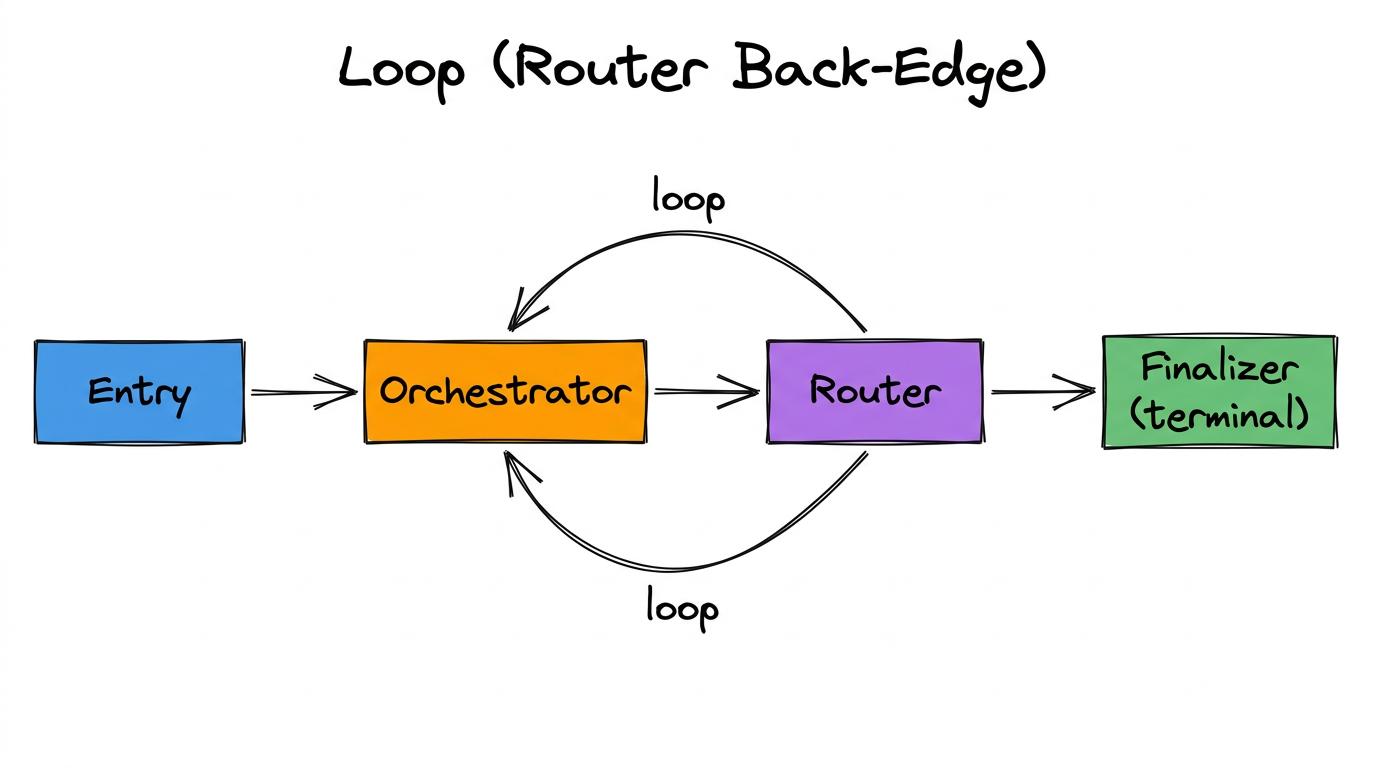
The Router decides: “Is the work good enough?” If not → send back to Orchestrator for another pass. If yes → send to Finalizer to produce final output.
The Problem: What Happens on Re-Entry?
When execution loops back to an LLM Node, a question arises: what conversation history should the LLM see?
- If it sees the same history as before with no new information, it will produce the same output — an infinite loop of identical responses.
- If the history grows unboundedly, the context window fills up and the LLM loses track of earlier information.
This is why loop mode exists. It tells the compiler how to manage conversation history for LLM Nodes that are loop targets.
Loop Mode
When an LLM Node has more than one incoming edge (one from upstream, one from a Router back-edge), the Loop mode field appears in its inspector. You must set it to one of two values:
| Mode | Behavior | Best For |
|---|---|---|
| Fresh | Restarts the conversation from scratch on each re-entry. The LLM gets a clean system prompt + human prompt, as if it’s running for the first time. If a feedback state variable is set, its value is injected as the human message instead of the original human prompt. | When you want each iteration to be independent. The LLM doesn’t see what it did in previous passes — only the feedback from the Router telling it why it was sent back. |
| Continue | Extends the accumulated conversation history. The LLM sees everything from all previous iterations plus any new feedback. History grows with each pass. | When the LLM needs to build on previous work. Good for incremental refinement where earlier context matters. |
Feedback State Variable
The Feedback state variable field appears when loop mode is set. It selects a state variable whose value is injected as a new human message on each re-entry.
This is how you give the LLM new context on each loop iteration. Typically, this is a variable written by the Router or an upstream node explaining why execution was sent back.
# State variables:
analysis_result     str    # Written by Orchestrator
routing_reason      str    # Written by Router (why it looped back)
final_report        str    # Written by Finalizer

# Orchestrator config:
loop_mode: "fresh"
loop_feedback_state_key: "routing_reason"

# What happens on re-entry:
# Pass 1: Orchestrator runs with original prompts → produces analysis
# Router: "Analysis is too short" → writes routing_reason, loops back
# Pass 2: Orchestrator gets clean context + "Analysis is too short"
#          as its human message → produces better analysis
# Router: "Analysis is comprehensive" → exits to FinalizerExit Conditions
Every loop must have a clear exit path. This is enforced at two levels:
1. Topology Validation (Compile-Time)
- The Router in the cycle must have at least one outgoing edge that exits the cycle.
- If all Router edges stay within the cycle, the validator blocks export.
2. Router Prompt (Runtime)
The topology check only verifies that an exit path exists. Whether the Router actually uses it depends on its system prompt. Write clear exit criteria:
"You are a quality evaluator. Based on the analysis_result:

- Route to 'Orchestrator' if:
  - The analysis is under 200 words
  - Key aspects are missing or vague
  - The result explicitly says more work is needed

- Route to 'Finalizer' if:
  - The analysis is comprehensive (200+ words)
  - All major aspects are covered
  - The result is ready for final formatting

When in doubt after 3+ iterations, route to Finalizer
to avoid endless loops."
Common Mistakes
| Mistake | What Happens | Fix |
|---|---|---|
| Loop without a Router | Infinite loop. Validator blocks export. | Always use a Router to control loop iteration. |
| Router with no exit edge | Infinite loop. Validator blocks export. | Ensure at least one Router output goes to a node outside the cycle. |
| No loop_mode on target node | Validator blocks export. | Set loop_mode to “fresh” or “continue” in the LLM Node inspector. |
| Vague Router exit criteria | Router loops forever at runtime (no validator catch). | Write specific, measurable exit conditions in the Router prompt. Include a fallback (“after N iterations, exit”). |
| Fresh mode + no feedback variable | LLM gets the same prompt every time, may produce same output. | Set a feedback state variable so each iteration gets new context. |
ASL Example: Complete Loop
{
  "graph": {
    "entrypoint": "1",
    "state": {
      "schema": {
        "analysis_result": "str",
        "final_report": "str",
        "routing_reason": "str"
      }
    },
    "nodes": [
      { "id": "1", "type": "EntryPoint", "label": "EntryPoint",
        "config": { "title": "Entry Node",
                    "initial_state": { "analysis_result": "str",
                                       "final_report": "str",
                                       "routing_reason": "str" } } },
      { "id": "2", "type": "LLMNode", "label": "Orchestrator",
        "config": { "title": "Orchestrator",
                    "system_prompt": "You are an orchestrator...",
                    "human_prompt": "Analyze the problem...",
                    "loop_mode": "fresh",
                    "loop_feedback_state_key": "routing_reason",
                    "output_state_keys": ["analysis_result"],
                    "structured_output_schema": [
                      { "name": "analysis_result", "type": "str",
                        "description": "Analysis findings" }
                    ] } },
      { "id": "3", "type": "RouterBlock", "label": "Router",
        "config": { "title": "Router",
                    "input_state_keys": ["analysis_result"],
                    "system_prompt": "Evaluate the analysis...",
                    "router_values": [
                      { "node": "Orchestrator",
                        "description": "Analysis needs refinement." },
                      { "node": "Finalizer",
                        "description": "Analysis is complete." }
                    ] } },
      { "id": "4", "type": "LLMNode", "label": "Finalizer",
        "config": { "title": "Finalizer",
                    "system_prompt": "Produce the final report...",
                    "output_state_keys": ["final_report"] } }
    ],
    "edges": [
      { "from": "1", "to": "2", "type": "NormalEdge" },
      { "from": "2", "to": "3", "type": "NormalEdge" },
      { "from": "3", "to": "2", "type": "ConditionalEdge",
        "condition": "Orchestrator" },
      { "from": "3", "to": "4", "type": "ConditionalEdge",
        "condition": "Finalizer" }
    ]
  }
}
Note the highlighted loop_mode and loop_feedback_state_key
on the Orchestrator. The Router can loop back to Orchestrator or exit to Finalizer.
Chapter Summary
- Loops require a Router with a back-edge and an exit edge.
- An LLM Node’s output always connects to exactly one downstream node (one LLM or one Router). The Router creates the branching.
- Loop target LLM Nodes must have
loop_modeset (fresh or continue). - Use a feedback state variable to give the LLM new context on each iteration.
- Write clear, specific exit criteria in the Router prompt.
- The topology validator catches structural loop problems; runtime behavior depends on your prompts.